Animate
The Animate panel
76 one-click animation presets — entrances, exits, loops, write-ons and text moves that drop real, editable keyframes.
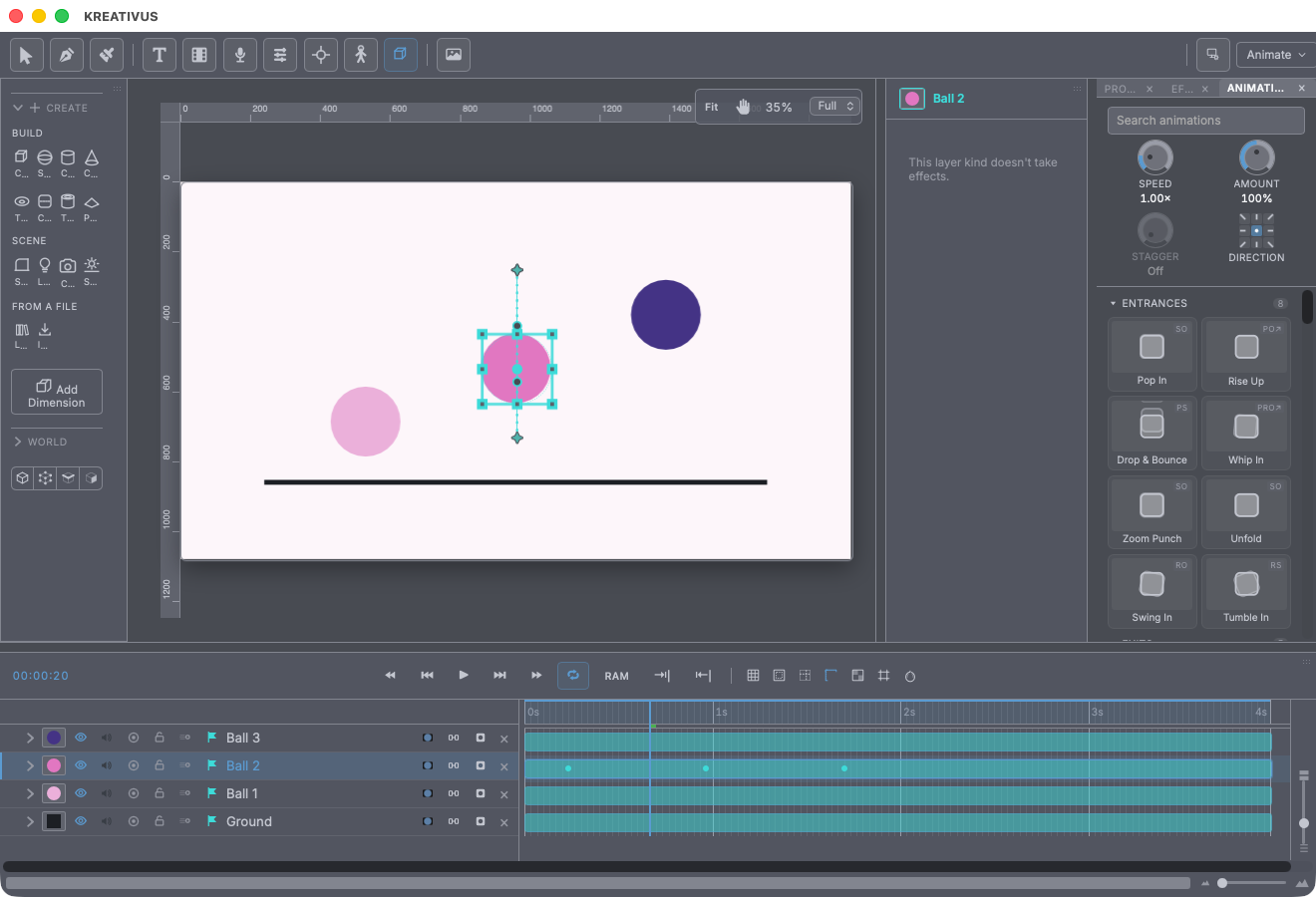
Park the playhead, select layers, press a preset — real keyframes land, eased and ready to edit. That’s the whole gesture, with three things After Effects makes you do by hand folded into the press:
- Speed retimes every preset before it lands (0.25×–4×). Each keeps its authored character — a strobe stays short, a slow zoom stays long.
- Amount scales how far the motion goes — 100% as designed, 50% a hint of it. (On Text presets it scales the travel, never the sweep — a Typewriter at 50% still finishes typing.)
- Stagger cascades a multi-layer selection, top of the stack downward — a whole title sequence from one press.
And the Direction pad: eight compass points around Auto. An entrance arrives from the chosen direction, an exit leaves toward it. Only presets marked ↗ travel; a Fade has nothing to aim.
Presets are relative to the layer, never absolute — Fade In on a layer sitting at 60% opacity ends at 60%; Slide In measures its travel in the layer’s own size, so one preset is right for a title card and a thumbnail. Existing keyframes on other frames survive; a preset applied to an already-moving layer continues from where it is. Hover any tile and it plays its actual recipe — the preview is the animation, not a drawing of it.
The catalogue
Entrances — Pop In, Rise Up, Drop & Bounce, Whip In, Zoom Punch, Unfold, Swing In (drops on a hinge and rocks to a stop, like a hung sign), Tumble In.
Exits — Pop Out, Fall Away, Fly Off, Shrink Away, Fade Down (“the polite way to leave”).
Emphasis — Pulse, Shudder, Jelly, Rubber Band, Head Shake (says no).
Idle Loops — the keep-alive family, every one looping forever: Sway, Bob, Breathe (the cheapest way to make a still drawing alive), Drift, Tumble (two keyframes, endless turn), Blink, Flicker (faulty neon — no two beats the same), Jitter (stop-motion boil), Heartbeat (two beats then a rest, the way a real one goes), Wiggle.
Scale — Scale In / Out, Scale In Overshoot, Squash Settle (weight from scale alone), Slow Zoom, Card Flip (fake 3D from a negative scale).
Position — Slide In / Out, Nudge, Anticipate & Go (winds up the wrong way, then takes off — the oldest trick there is).
Rotation — Spin In, Turntable (the endless product-shot turn — needs a 3D layer), Tilt In, Wobble, Nod (says yes).
Opacity — Fade In, Fade Out, Fade In & Out (a whole beat in one press), Materialize (stutters into existence).
Trim Paths — ten write-ons for any path or brush stroke: Write On, Quick Draw, Slow Draw (a signature being written), Overshoot Draw, Bounce Draw, Erase Off, Retract (un-draws back the way it came), Write & Erase, Chase (a segment runs the path forever), Segment Travel.
Stroke & Shape — Marching Ants (needs a dash pattern), Ink On, Line Pulse, Clock Wipe (needs an ellipse — sweeps it on like a clock hand), Star Pulse (needs a star).
Text — eleven presets that set up a full text animator: Typewriter, Fade Up Words, Cascade, Scramble On, Wave, Ripple Scale, Fly In, Unspace (letters flung apart draw together into the word), Line Reveal (for credits), Jitter Text (hand-lettered boil), Drop Out.
Audio — Audio Fade In / Out, Duck (dips under a voiceover and comes back).
Tiles wear honest badges — which properties a preset keys (P/S/R/O, ✂ for trim, ♪ for volume) and ↗ if the pad can aim it — and grey out with a reason when a layer can’t take them (“needs a stroke”, “needs an ellipse”). Star favourites to pin them on top.
Make your own
Keyframe something, select those diamonds, right-click → Save as Animation Preset…. The dialog asks only what the keyframes genuinely can’t say: whether the motion ends where the layer is (an entrance) or starts there (an exit), and whether distances should scale with the target layer’s size like the built-ins do. Easings, channel offsets and a captured text animator all travel with it. Saved presets live in your app-wide library — first category in the panel, previewed and aimed exactly like the built-ins, in every project.
Recipe — a title sequence in four clicks. Select the six title layers → Stagger 4 → Direction ◀ (arrive from the left) → press Rise Up. Then select them again and press Fade Down at the out point with Stagger still on. Done — twelve properly-eased, individually-editable animations.