Effects
Generators
Gradient, Gradient Mesh, Fractal Noise, Audio Waveform and Ripple — content drawn from nothing, keyframable and mask-friendly.
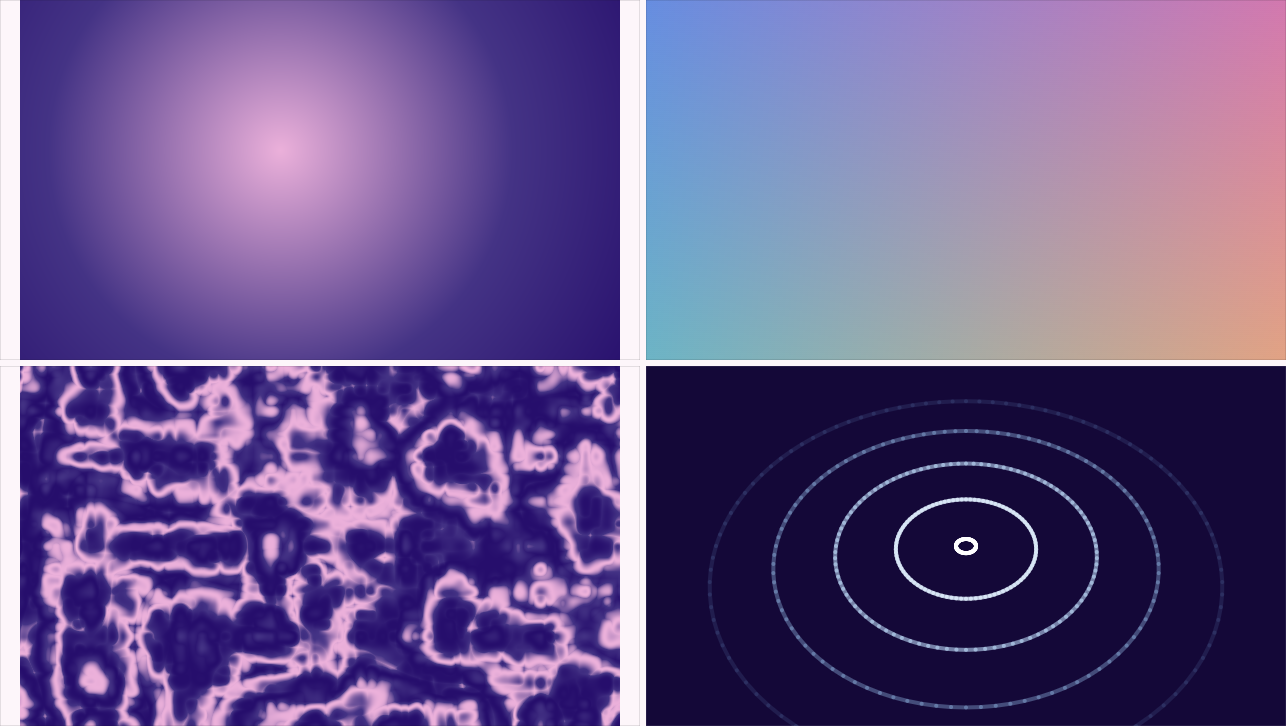
The Generate category draws content from scratch. Every generator here can be added with nothing selected — it makes its own layer — and each one has a considered answer to “what happens to what’s underneath”: the ramp and the noise re-colour existing pixels without creating opacity, so dropped straight onto a shape they texture the shape, not a rectangle over it. For full-frame washes, put one on an adjustment layer.
Gradient
The ramp itself as an effect — which buys three things a shape’s fill gradient can’t do: its handles keyframe, it can sit on an adjustment layer and wash everything below, and it can be masked to part of the frame.
Five styles read the same two draggable handles, so switching never loses your placement: Linear, Reflected (the ramp runs out both ways), Radial (handles become centre and rim), Angular (a sweep — the end handle drags the seam), Diamond. The colour ramp is the full multi-stop gradient editor, and it’s keyframable as a whole — a keyframe crossfades entire ramps, not just endpoints.
Dither is on by default at a whisper: wide gentle ramps band on real displays, and 1/255th of ordered dither breaks the bands while staying invisible as texture — and static, so the gradient stays cacheable instead of shimmering.
Gradient Mesh
Illustrator’s gradient mesh, animated: a deformable grid of coloured points (2×2 up to 12×12), interpolated smoothly across the frame — the modern “mesh gradient” look. Drag points and their colours around on the canvas; each point’s colour has real alpha, so a mesh can fade out at its edges.
The whole mesh keyframes as one pose — positions and colours together, one stopwatch. That’s deliberate: a mesh gradient is a single design that morphs, not 25 independently-timed dots. Key two poses and the design breathes between them.
(One honest warning the panel also states: changing the grid size resets the mesh and clears its keyframes — a 3×3 pose can’t describe a 5×5 grid.)
Fractal Noise
The real from-scratch noise generator — After Effects’ Fractal Noise, powered by the same 21-texture engine the 3D Materials system uses. Pick a Type:
- Organic — Value/fBm (the workhorse), Turbulence (billowy — clouds, smoke), Ridged Multifractal (cracked, mountainous), Wavy Turbulence (marbled), Electric (thin bright veins).
- Cellular — Worley (stone pores), Voronoi F2 and Voronoi Edges (crack networks), Cell Noise (flat mosaic cells), Dents, Sparse Convolution.
- Surfaces — Wood, Marble, Fire, Water, Cyclone, Sunburst, Starfield.
- Patterns — Checker, Tiles, Brick.
Scale and Anisotropy size and stretch the features (wood grain is just noise stretched hard on one axis); Octaves / Persistence / Lacunarity shape the fractal detail where the texture has any; the colour ramp maps the field through a full gradient (black-to-white by default — classic grayscale noise, one ramp edit away from fire or contour maps).
Animation Speed gives the field a clock — 0 is perfectly static (and bit-for-bit cacheable); above it the noise smoothly evolves, the C4D convention. Rolling clouds are one number.
Audio Waveform
Draws a layer’s sound. Point it at a video or audio layer and pick a style:
- Envelope styles — Line, Filled, Bars, Mirrored Bars: the amplitude over a time Span around the playhead, scrolling with the shot.
- Spectrum styles — Spectrum, Blocks (the hardware level-meter look), Radial Spectrum: the frequency content at this instant, so every bar jumps on the beat.
- Dots and Radial Wave round out the set — a dotted meter, and the envelope wrapped into a wobbling ring.
The drawing stays honest: it’s tied to the layer, so trimming or sliding the audio retimes the picture with it, using the same clock the real export mixdown uses — a music visual that’s subtly out of sync is worse than none, so it can’t be. Peak caps (with a hold time) make bar banks read as alive; the colour is a full gradient, painted Across the drawing or By Level — the meter convention where the top of the scale goes red. Radial styles add Inner Radius and Rotation.
Ripple
An emitter that fires expanding outlines — After Effects’ Radio Waves, rebuilt. Each wave ages, grows, spins, fades and recolours over its own life: the colour gradient is sampled across a wave’s lifetime (stop 0 at birth, stop 1 at death), which makes the ramp an animation rather than a decoration.
Shape picks what expands: Circle, Polygon, Star, rounded Square — or From Layer, which copies any layer’s outline, normalised so switching sources never resizes the animation. Draw a heart; broadcast hearts.
Rate, Lifetime, Expansion, Start Radius run the emitter (all per-second, so the same emitter reads identically at 24 and 60 fps). Tilt X/Y + Perspective tip the emission plane with a real projection — waves genuinely converge as they recede, which is the difference between “ripples on a floor” and “a squashed ring.” Wobble roughens the outlines; Spin rotates each wave as it grows.
Recipe — sonar on a floor. Ripple with Tilt X ~55, a long Lifetime, low Rate, thin Thickness, and a colour ramp fading to transparent. Instant radar sweep in perspective.
Recipe — a live music bar bank. Audio Waveform → source your track’s layer, Style → Blocks, Color → By Level with a green-to-red ramp, Peak Hold ~0.6s. The hardware meter, drawn by your actual mix.