Effects
Weather
Rain, snow, fog and light rays as one effect — every module answering to the same wind, the same ground and the same clock.
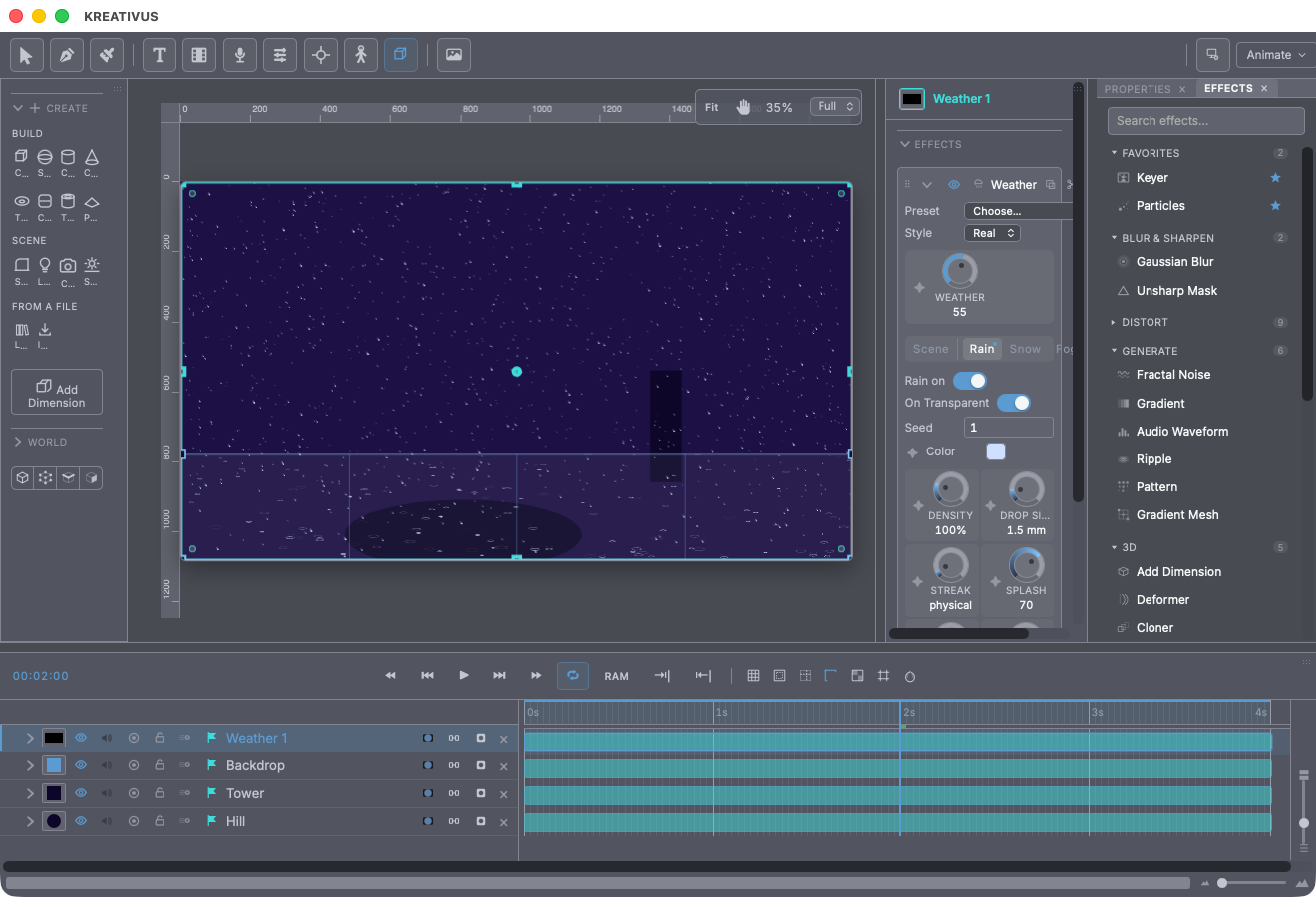
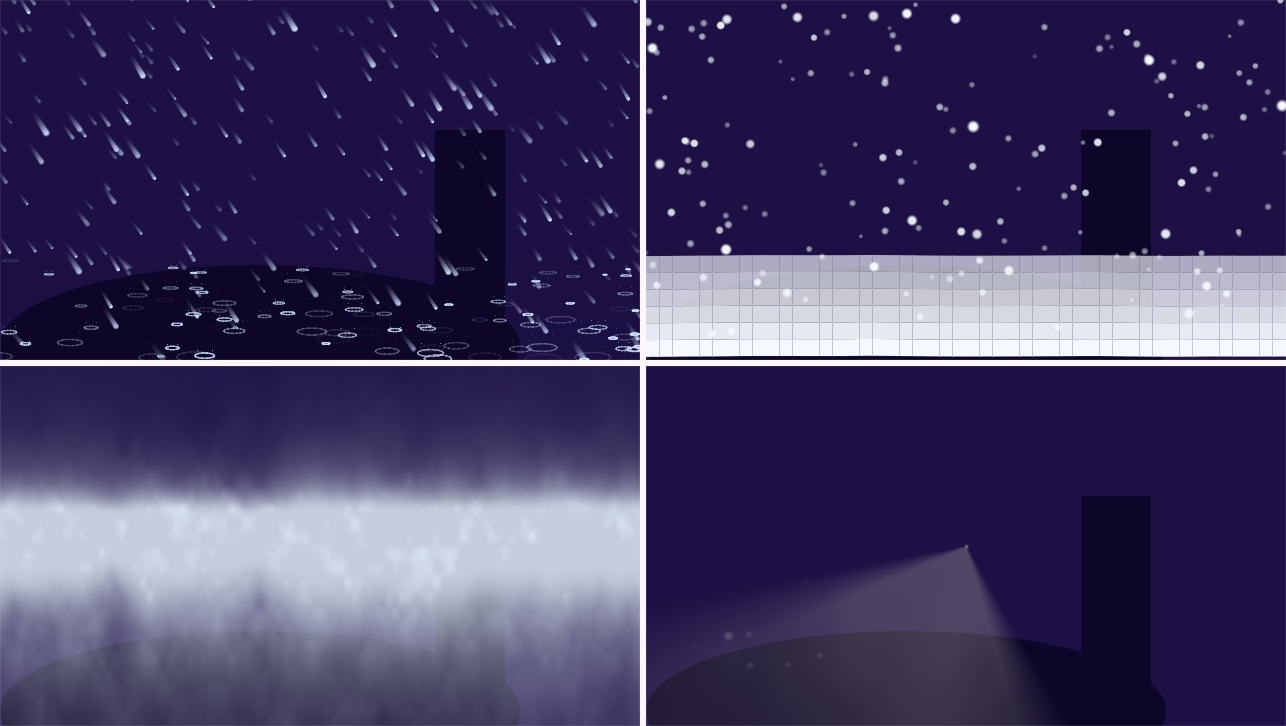
Weather is one effect with four modules — Rain, Snow, Fog and Light Rays — rather than four effects. That’s not packaging; it’s the point. What separates a storm from particle confetti is that everything answers to the same wind and the same clock: one keyframed gust leans the rain, streams the snow and shreds the fog together. And you only pay for what’s on — a module that’s off draws nothing and costs nothing.
Like Particles, the whole system is scrub-proof: every drop’s position comes fresh from the seed and the frame, never from a running simulation. Any frame is the same picture no matter how you arrived at it, and export matches preview exactly.
One more thing that makes the defaults behave: Weather thinks in real units. Drop size is millimetres (and sets true terminal velocity — bigger drops genuinely fall faster and streak longer); wind is metres per second. They become pixels through the comp’s own world scale, so the defaults look right on any comp size.
Real or Toon
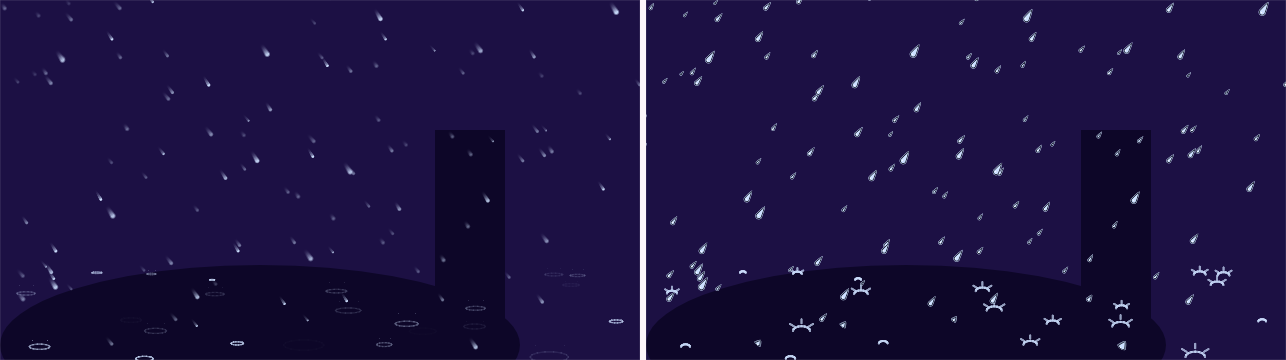
Style switches which hand draws the storm — not which storm falls. Real renders motion-stretched photographic streaks; Toon renders outlined drawn glyphs — from the identical drop positions, so you can keyframe a hard cut between styles mid-shot and the weather underneath never changes.
Toon options: Animate On holds the drawn weather on ones, twos or threes (the hold is most of what makes it read as drawn), an Outline weight (goes cleanly to zero for flat no-keyline styles), a rain Glyph (Teardrop — the storybook drop; Line — the anime convention, best at small sizes; Dot — flat and graphic) and a snow Flake (Star — the sparkle everyone draws; Dot — quietest in a dense fall; Hex — the shape a real flake actually is).
Fog and rays stay photographic in both styles, deliberately — cel elements over photographically lit air is animation’s own long-standing composite.
Weather — the master
The big dial above the tabs scales every module’s presence at once. It’s the one control worth keyframing to get a credible storm arc; each module’s own Density multiplies on top of it.
Scene tab — what every module shares
Storm: Wind (m/s) and Wind Dir. Keyframed wind works properly — the sideways drift is accumulated over time, not guessed from the current value, so a gust that ends doesn’t teleport the rain back.
The ground is a quad, not a line. Four corner handles in the viewport (Near left/right, Far left/right) define the floor as a plane in perspective. That one decision buys the whole depth story for free: a drop’s distance places it between the near and far edges, and the quad’s own convergence gives its size, speed and opacity — a floor that narrows toward the horizon produces rain that gets smaller and slower toward that horizon, with no extra controls. Drag the far corners inward and watch the far rain shrink to match.
Camera: Perspective (how much nearer drops outgrow far ones), Focus + Aperture (a real depth-of-field pair — photographic rain is rarely sharp front to back, and the soft near drops are much of why a plate reads as photographed), and Scale — a virtual dolly. Standing closer makes drops grow, fall faster in pixels, streak longer and thins the field (twice as close shows a quarter of the world), which is exactly what separates “camera moved in” from “zoomed on wallpaper.”
Near Cut / Far Cut slice the storm by depth — the sandwich workflow. Split at any value, put the far copy behind your character and the near copy in front, and the two together are pixel-for-pixel the storm you started with. Fog composes correctly through the split too.
Producer: Center and Width confine the fall to part of the frame — rain through a doorway, past a window, on one side of the street.
Rain tab
Density (multiplies the master), Drop Size in mm, Streak (1.0 is the true 180°-shutter length; higher is the classic stylised long streak), Color, and two ground controls: Splash — how strongly impacts show (“the eye forgives almost anything about streaks in the air and forgives nothing about impacts”) — and Wetness, how dark and glossy rain leaves the ground. Memory is the time constant of that ground state: how long it stays wet after the rain stops.
Snow tab
Density, Flake Size (mm — and unlike rain, size and fall speed are only loosely coupled: a big flake is mostly air), Color — and the two that make it snow:
- Flutter — the single most important snow control. Each flake rocks side to side with its own phase; at zero, every flake drops dead straight and the field reads as a screensaver.
- Tumble — how often a flake turns face-on and catches the light for a frame. That’s why backlit snow sparkles.
Accumulate piles snow up on the ground (in pixels of depth at the near edge), governed by the same Memory clock — long memory leaves a blanket behind the storm, short memory thaws almost as fast as it falls.
Fog tab
Fog does two jobs, and the second is the one that matters: it draws banks, and it attenuates every drop and flake by the air in front of it. Without that, fog is a wash over the top and the storm still reads as sprites on glass.
Density (percent of “thick enough to hide the horizon”), Height and Falloff shape the bank — ground mist, valley fill and full soup are all settings of this pair, which is why there are no fog “modes.” Layers (1–3) builds the fog from parallax banks: the near bank tears past at wind speed while the far one barely breathes, and that speed difference — not the noise — is what the eye reads as depth. Bank Size, Churn (banks changing shape where they stand — dead-calm fog still breathes), Color, and Glow — the silver lining on a bank’s upward edge that makes fog read as lit through rather than painted over.
Rays tab
Crepuscular light: drag the Light point in the viewport, then shape the beams with Brightness, Length, Spread (180° is a bare bulb; narrow it and shafts fan out of a gap) and Direction. Shimmer makes the beams breathe — a ray that doesn’t shimmer is a gradient; one that does is air. Dust adds a few drifting motes alive only inside the beam (fifteen beat five hundred — they’re punctuation, not texture). Occlude lets whatever is already on the layer block the light: beams are shadows made visible, and this is what turns a generic glow into this shot’s light.
The 13 presets
Each preset moves several controls together — heavier rain isn’t just denser, it’s bigger-dropped, faster, longer-streaked and wetter at the ground. Your ground quad and Style choice survive; each preset also states which modules it wants, so switching from snow back to rain doesn’t leave both falling.
| Preset | Modules |
|---|---|
| Drizzle · Steady Rain · Downpour · Windy Squall | rain |
| Gentle Snow · Blizzard | snow |
| Morning Haze · Ground Mist · Pea Soup | fog |
| Rain Through Fog | rain + fog |
| Window Light | rays |
| Crepuscular | rays + fog |
| Rain in the Beam | rain + rays |
Recipe — rain around a character. Duplicate the weather layer. On the copy behind your character set Far Cut to ~45; on the copy in front set Near Cut to ~45. Together they’re exactly the original storm — with your character standing inside it.
Recipe — drawn rain over a cel scene. Style → Toon, Animate On → Twos, Glyph → Line, Outline ~0 for a flat look. The rain now holds and pops in step with drawn character work.
On Transparent (on by default) outputs the weather alone for compositing over a shot; Seed re-deals every particle — same seed, same pixels, forever.